Meet The Developer

I'm Noel Macwan, An 18 years old developer Currently living in Gujarat, India.

author

[ROM][4.2.2][All BL] SXDXMZ1 ROM for Xperia M | Build 2 !

Leave a Comment
Introduction:-
So the same ROM is now also available for new build and uploaded to Dropbox ! so you dont need that previous one and torrents stuffs and all as you guys told me

This ROM can be install on all bootloader - unlocked as well as locked bootloader
Flashable Zip is made for Unlocked Bootloader &,
ADB PUSH tool for Locked Bootloader 
As well this is first custom rom for Xperia M , this ROM is Stock Based 4.2 

Follow Me :-
On Facebook :- https://www.facebook.com/Noel.Macwan.SXD
On Twitter :- https://twitter.com/@noelmacwan1997

Features:-

Zipaliged , 
zipalign is an archive alignment tool introduced first time with 1.6 Android SDK (software development kit). It optimizes the way an Android application package (APK) is packaged. Doing so enables the Android operating system to interact with the application more efficiently, and hence has the potential to make the application and overall the whole system much faster. Execution time is minimized for zipaligned applications, resulting is lesser amount of RAM consumption when running the APK  

Deodexed , 
Deodexing is basically repackaging of these APKs in a certain way, such that they are reassembled into classes.dex files. By doing that, all pieces of an application package are put together back in one place, thus eliminating the worry of a modified APK conflicting with some separate odexed parts.

In summary, Deodexed ROMs (or APKs) have all their application packages put back together in one place, allowing for easy modification such as theming. Since no pieces of code are coming from any external location, custom ROMs or APKs are always deodexed to ensure integrity. 

Z1 Stuffs : 
                  1) Xperia Z1 Home
                  2) Xperia Z1 Walkman
                   3) Xperia Z1 Album
                   4) Xperia Z1 Movies
                   5) Xperia Z1 Sony Select
                   6) Xperia Z1 Themes
                   7) Xperia Z1 Home Widgets
                   8) Xperia Z1 Status Bar
                   9) Xperia Z1 Settings  
                   10) Xperia Z1 Boot Animation
                   11)Xperia Z1 Phonebook
                   12) Xperia Z1 Conversations
                   13) Xperia Z1 Fonts
                   14) Xperia Z1 Look Like Animations
                   15) BE2 And X-Reality Ported
                        And Much More 
  
 Screen Shots :-
  Randomly Arranged


Instructions:-
First Download
ROM Data 
Step 1 :- Get it from Here !! or Here !!
Flashable Zip for Step 1 :- Click Here to Download !!
ADB Push tool for Step :- Click Here to Download !!
 
Step 2 :- Get it from Here !! or Here !!
Flashable Zip for Step 2 :- Click Here to Download !! 
ADB Push tool for Step 2 :- Click Here to Download !!

You need to be on 4.2 Firmware first 
If you are using Xperia M single then first flash 4.1.2 stock firmware (with wiping cache ) and then flash 4.2 firmware without wiping cache and data 

ROM Installation Guide :-
you need to install "Step 1" and "Step 2 " individually , please don't merge it or else you will face some FCs ! 
 
For Locked Bootloader :-

Download ADB Push tool then copy ROM  "system" folder to "files" of push tool and then  connect your phone via USB Debugging on  make sure that you have rooted and installed busybox. Now , Press 1 and enter wait for some mins until that doesn't shows "Installation Completed" 
ADB Push will mess with permissions so its not recommended but if you don't care about file permissions and care about bootloader then this method is better for you  

For Unlocked Bootloader :-
Download flashable zip then copy ROM data to "system" folder ,  make sure that you have rooted ,installed busybox and CWM . 
Now , Go to CWM , Wipe Everything ( Factory Reset , Cache , Dalvik )  And then install the Zip and then reboot ... wait for your device to complete booting 
Flashable zip wont mess with permissions so its recommended to use this method !  

Frequently Asked Questions and Answers:- 

This ROM can be install on Lock bootloader ?
Yes, it can .. just use push tool but it is not safe it will change permissions 

Is this ROM contains pre swapped storage ?
No , there is no safe way or i haven't worked that yet .. Sorry 

Will you add swap storage in next build or give it in update package ?
I'll try out that or i will make a new ROM for the new build which is just released 

This ROM is based on  ?
this is based on stock firmware of Xperia M Dual but this can be install in any variant of Xperia M

Please Don't expect more updates and bugs fixes right now ! 
I'm busy with my studies, but I'll Do my Best for giving you the best Stock Based ROM , I apologize but i can't do anything 

Credits:-
  - All SXDevelopers Members
 - Ben Ling For giving me Latest Z1 Stuffs 
 - dsixda for Android Kitchen
 - TakuyaZ for helping me to deodex , zipalign , total support ,   Z1 Settings Arrangements and      final touchings
 - Myself for everything 
 - Jeremiah Marfil for Z1 Settings Arrangement 
 - Rizal Lovins for apktool And Timescape
 - Sahaab for White Settings
 - Zeroinfinty for SemcClock, Calander,Home Widgets
 -  niaboc79 For conversations and phonebook

Please Don't Steal My Works or Share/ Add them in your Roms without taking permissions from me . 

Regards 

Author/ Admin @ SXDevelopers

Read More

[UB][ROM] SXDXMZ2 ROM for Xperia M ~ Bring out Sirius From Nicki

7 comments
Introduction:
And after a long time, I'm now able to release this ROM ...
This is just second edition of SXDXMZ1 ROM , this one is packed with Z2 features and other stuffs, Lets we familiar with them ..

Find me on :
Facebook !  Twitter ! +Google

Get instant support from SXDeveloper Facebook group : Here !

Disclaimer:
You are doing all the stuffs on your own, 
If you messed with your device , im not taking any responsibility of it !
Most probably your device will be soft brick so chill and flash out stock rom and you are good 

Features:

Z2 Stuffs :-
- Z2 Themed Framework
- Z2 Media Apps 
- Z2 SystemUI
- Z2 Bootanimation
- Z2 Themed Launcher
- KitKat gradient styled Status and Nav bar
- Z2 Stock Themes
- Z2 Setup Guide
and other common things for theming up to Z2 UI

Common :-
- Intergrated Sys Dalvik Cache to system apps 
- Deodex framework
- Based on Stock 4.3 15.4.A.0.23 ROM

Kernel :- 
SXDNickiSS Lite Edition

Linaro 4.6 toolchain
~ Linux Kernel 3.4.4
~ 1.5 GHz CPU OC with updated core voltage table
~ USB Fast Charge
~ Smooth Scrolling Table
~ Improved 3x faster integer sqrt
- WiFi working with stock prima module

- XZ compression for lighter zimage and faster boot 
- Combined with CWM recovery
# probably backlight isn't working ( light sensor)

Screenshots


Bugs:
ROM is based on stock 4.3 Initial release so the bugs will be followed from it only , no external bugs are found !  
Found bug ? PM me on FB

Instructions:
Make sure its unlocked bootloader
Copy ROM to device
Power off your device
get boot.img from zip 
Connect into fastboot mode (USB + Vol +)
FlashTool> Flash> Fastboot mode > Select kernel to flash
and browse the kernel
See log , if its succesfully flashed , unplug device 
and boot to recovery via pressing vol + key
Wipe Cache and Data 
and Flash Deodex Package and than ROM Zip
Reboot 

Download:
Build 1 : Click Here to Download !!

Credits: 
This ROM wasn't possible with these all guys , Thanks a lot :-
Natsu for helping me with settings 
niaboc79 for Xperia Z2 Home, Clock, Calendar 
jzqs for Z2 SystemUI
Ben Ling for Z2 Widgets, Startup guide and other apps
If you think that you must be credited here, then please let me know !

Please consider donating me if you like my work and want me to continue it 
my paypal email - nilpamacwan1972@gmail.com

Regards
Noel Macwan
Read More

[UBL] SXDNickiSS Lite Edition Kernel for Xperia M SS 4.3

23 comments

Hey ! , After a long time break , im presenting you custom kernel for Xperia M running on stock 4.3 , you must be familiar with SXDNickiSS kernel and this kernel is lite edition of it .. so just some features which are really makes comfort to a normal user that type of charges are only merged into this...

Requirements:
You must be using stock 4.3 
Flashtool
Unlocked bootloader 

Features:
Linaro 4.6 toolchain (v1 onwards)
~ Linux Kernel 3.4.4 (v1 onwards) 
~ 1.5 GHz CPU OC with updated core voltage table (v1 onwards) 
~ USB Fast Charge (v1 onwards) 
~ Smooth Scrolling Table (v1 onwards) 
~ Improved 3x faster integer sqrt (v1 onwards) 
- WiFi working with stock prima module
- XZ compression for lighter zimage and faster boot (v1 onwards)
- Combined with CWM recovery (v1 onwards)

~ 1.6 GHz CPU OC  (v1.5 onwards)
~ 450 MHz GPU OC (v1.5 onwards)

~ Merged CAF kernel (v2 onwards)
~ use Prima module for wlan driver (v2 onwards)
 
Downloads:
v1:- Click Here !!
v1.5:  Click Here !!
v2: - Click Here !!

Instructions:
Make sure its unlocked bootloader
Power off your device
Connect into fastboot mode (USB + Vol +)
FlashTool> Flash> Fastboot mode > Select kernel to flash
and browse the kernel
See log , if its succesfully flashed , unplug device 
and boot it  

Credits:
Sony for device and source
Arnav Gosain for build server
DooMLoRD, faux123 , varun chitre and all our great Xperia Devs
and Budhy for Benchmark screen shot

Having problems ? Join SXDevelopers Facebook group !

Please consider donating me if you like my work and want me to continue it 
my paypal email - nilpamacwan1972@gmail.com

Regards
Noel Macwan

Find me on :-
Facebook          Twitter           Google+
  
Read More

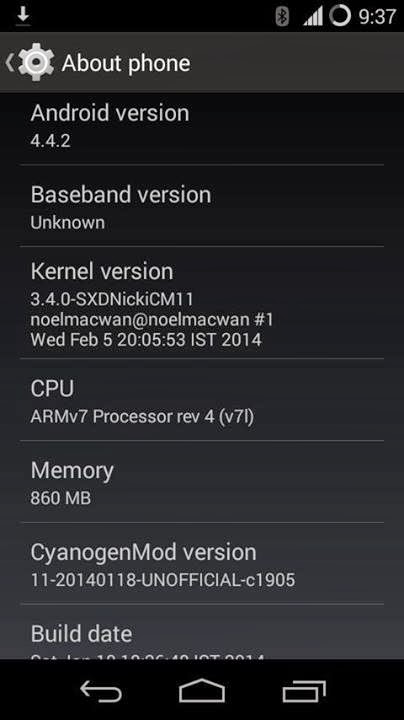
[CM11 4.4.2] SXDNickiCM11 Kernel for Xperia M

5 comments


Introduction:-

Hello Friends ..
I wanna share my new kernel for Xperia M running with CM11 (Android 4.4.2), I'm not expert in it but I'm learning day-by-day and I hope you will like my work.

Follow Me :-
 
Disclaimer:-

I'm not taking any responsibility if you mess out with your device
And Make sure that you are running in CM11Beta 2
You are doing this your own risk.
Skip this , If you don't want to loose your device
Although its tested but if you will play with files in this mod then Its over you. 
I Hope you have read this carefully, Now move to next steps :

Requirement :-
FlashTool 
 
Features :-

- Over clocked CPU to 1.566 GHz (v1 onwards)
- Over clocked GPU to 450 MHz (v2 onwards)
- Compile using LINARO 4.6.2 Toolchain ( in v1 and v2 only )
- Set Overclock default ( in v1 and v2 only )
- Added Intellidemand 4.4 (v2 onwards)
- Set Intellidemand as default (v2 onwards)
- Set westwood as default (v2 onwards)
- Read Ahead buffer size to 2048 (v2 onwards)
- Enabled PS3 Controller driver (v2 onwards)
- Added Dynamic Fsync control (v2 onwards)
- Compiled Using Linaro 4.7.4 ( in v3 )
- Unset Overclock as default ( in v3 )
- Disabled Gentle Flair Sleepers ( in v3 )
- Increased Asynchronous I-O latency SSD ( in v3 )
- Added ZRAM Support ( in v3 )
- Other I have forgotten

Instructions :-

1.First download kernel from belove
2. Now open flashtool than flash and fastboot 
3. Connect your device and press volume up key at the same time 
4. You will get new window of Flashtool , asking the next step for fastboot 
Now Select the kernel 
5. It will now flash , wait for 1 sec and unplug your device and boot it
You're Done !

For booting into CWM Recovery you will require to press volume up key at startup and illumination bar will switch to blue light and after some secs recovery will come , Enjoy !

Instructions to enable any feature in this kernel is below 

Note:-
Don't use this kernel on any other build than Beta 2 , i have tested it in Beta 1 and WiFi isnt working 

Downloads :-


Changelog :-

 v1 - Inital release 
- Over clocked CPU to 1.566 GHz
- Partially Over clocked GPU to 450 MHz 
- Compile using LINARO 4.6.2 Toolchain

v2 
- Over clocked GPU to 450 MHz 
- Set Overclock default 
- Added Intellidemand 4.4
- Set Intellidemand as default 
- Set westwood as default 
- Read Ahead buffer size to 2048 
- Enabled PS3 Controller driver 
- Added Dynamic Fsync control

v3
- Compiled Using Linaro 4.7.4
- Fixed Frequency Table
- Other Modifications to Frequency
- Better Stability than v2 
- Unset Overclock as default 
- Disabled Gentle Flair Sleepers
- Increased Asynchronous I-O latency SSD
- Added ZRAM Support
- Some other little changes 

How to Enable Features :-

ZRAM :-

Open Terminal

Now you need to login into root 
$ su

Create zram size
initialize /dev/zram0 with 96mb disksize with this command
$ echo 10066329 > /sys/block/zram0/disksize

Note: Disksize cannot be changed if the disk contains any
data. deactivate first before you can change its disksize.
use this formula for calculating the disksize you want
( ill use my 96mb as an example)
$ 96mb= 96×1024×1024)

Activate:
$ mkswap /dev/block/zram0
    swapon /dev/block/zram0

To check if you have swap enabled
$ free

and it should return something like this
$            total       used       free     shared    buffers     cached
Mem:        506188     419736      86452          0      49404     121960
-/+ buffers/cache:     248372     257816
Swap:      1534200     100348    1433852

*It should look similar
 
Deactivate:
$ Swapoff /dev/block/zram0
 
Credits :-
A great thanks to all :- 
Sony for awesome device and initial source code
Ron for CM11 and his source code
Linaro Toolchain Developers
Me for this kernel
Anse Bovi for his kernel and source ; i have did modifications from his source
thirdzcee for his kernel and source ; i have did modifications from his source
Amirul for testing this kernel
You for testing it
if you think that you should mentioned in credits then contact me with your info
Ill add you soon :) 

Please Don't Steal My Works or Share/ Add them in your Roms without taking permissions from me . 

Regards 

Noel Macwan
Author/ Admin/

Read More

Deodex And Zipalign 11.3.A.2.23 Xperia E Single

Leave a Comment
Introduction:-

Hello !!
So as the title says "Deodex 11.3.A.2.23 Xperia E " and which works on all bootloader 

Follow Me :-
On Facebook :- https://www.facebook.com/Noel.Macwan.SXD
On Twitter :- https://twitter.com/@noelmacwan1997

What is Zipalign And Deodex , What's the need of getting that :-


Zipalign:
zipalign is an archive alignment tool introduced first time with 1.6 Android SDK (software development kit). It optimizes the way an Android application package (APK) is packaged. Doing so enables the Android operating system to interact with the application more efficiently, and hence has the potential to make the application and overall the whole system much faster. Execution time is minimized for zipaligned applications, resulting is lesser amount of RAM consumption when running the APK  

Deodex :
Deodexing is basically repackaging of these APKs in a certain way, such that they are reassembled into classes.dex files. By doing that, all pieces of an application package are put together back in one place, thus eliminating the worry of a modified APK conflicting with some separate odexed parts.

In summary, Deodexed ROMs (or APKs) have all their application packages put back together in one place, allowing for easy modification such as theming. Since no pieces of code are coming from any external location, custom ROMs or APKs are always deodexed to ensure integrity.  
Disclaimer:-

I'm not taking any responsibility if you brick your device while loading this mod
You are doing this your own risk.
Skip this , If you don't want to loose root access if you loose you are require to root again .
Although its tested but if you will play with files in this mod then Its over you. 
I Hope you have read this carefully, Now move to next steps :

Requirement :-

Before you go ahead check first that whether you are using 11.3.A.2.2 or not 
Don't point finger at me if you do the changes in different firmware or device !

If you are going to use ADB Push Tool then you need to install busybox first  
if you won't install then it won't work and may have chances for soft bricking ...
 
Downloads:-
Deodex data files(Flashable zip Included)  :  Click Here to Download !!
ADB Push tool (if you don't have CWM)Click Here to Download !!


Instructions :-

With CWM
1.Copy it to your sd card
2.Turn off your phone and switch to CWM
3.Wipe data (factory reset) , if you won't do this then you will face apps related problems !
4.Install this zip
5.Reboot

Without CWM
After downloading Deodex  zip you will only have the data for installation process you need to copy the "system" folder which is in the zip to ADB push tool
Enable USB Debugging
Make sure that you have rooted your device!
Connect your device with PC and open "Menu" then just press "1" and then enter and it will push the files automatically
and later your device will reboot if it doesn't then reboot it manually


Cheers ! you have deodexed it ! 

Credits:-
Me for everything  

dsixda android kitchen 
Neri de la Cruz for giving me files
You for installing it !

Please Don't Steal My Works or Share/ Add them in your Roms without taking permissions from me . 

Regards 

Noel Macwan
Author/ Admin @ SXDevelopers !

Read More

Deodex 11.3.A.2.13 Xperia E Single

Leave a Comment
Introduction:-

Hello !!
So as the title says "Deodex 11.3.A.2.13 Xperia E " and which works on all bootloader 
If you are using Unlock bootloader then its recommanded to do the modifications via CWM and if you are using lock bootloader then you must use ADB push tool because you don't have any another way for installing this ...

Follow Me :-
On Facebook :- https://www.facebook.com/Noel.Macwan.SXD
On Twitter :- https://twitter.com/@noelmacwan1997

What is Zipalign And Deodex , What's the need of getting that :-


Zipalign:
zipalign is an archive alignment tool introduced first time with 1.6 Android SDK (software development kit). It optimizes the way an Android application package (APK) is packaged. Doing so enables the Android operating system to interact with the application more efficiently, and hence has the potential to make the application and overall the whole system much faster. Execution time is minimized for zipaligned applications, resulting is lesser amount of RAM consumption when running the APK  

Deodex :
Deodexing is basically repackaging of these APKs in a certain way, such that they are reassembled into classes.dex files. By doing that, all pieces of an application package are put together back in one place, thus eliminating the worry of a modified APK conflicting with some separate odexed parts.

In summary, Deodexed ROMs (or APKs) have all their application packages put back together in one place, allowing for easy modification such as theming. Since no pieces of code are coming from any external location, custom ROMs or APKs are always deodexed to ensure integrity.  
Disclaimer:-

I'm not taking any responsibility if you brick your device while loading this mod
You are doing this your own risk.
Skip this , If you don't want to loose root access if you loose you are require to root again .
Although its tested but if you will play with files in this mod then Its over you. 
I Hope you have read this carefully, Now move to next steps :

Requirement :-

Before you go ahead check first that whether you are using 15.1.C.2.8 or not 
Don't point finger at me if you do the changes in different firmware or device !

If you are going to use ADB Push Tool then you need to install busybox first  
if you won't install then it won't work and may have chances for soft bricking ...
 
Downloads:-

Deodex data files(Flashable zip Included)  :  Click Here to Download !!
ADB Push tool (if you don't have CWM)Click Here to Download !!


Instructions :-

For Unlock bootloader
1.Copy it to your sd card
2.Turn off your phone and switch to CWM
3.Wipe data (factory reset) , if you won't do this then you will face apps related problems !
4.Install this zip
5.Reboot

For lock bootloader
After downloading Deodex  zip you will only have the data for installation process you need to copy the "system" folder which is in the zip to ADB push tool
Enable USB Debugging
Make sure that you have rooted your device!
Connect your device with PC and open "Menu" then just press "1" and then enter and it will push the files automatically
and later your device will reboot if it doesn't then reboot it manually


Cheers ! you have deodexed it ! 
Credits:-
dsixda android kitchen 
Me for everything 

Please Don't Steal My Works or Share/ Add them in your Roms without taking permissions from me . 

Regards 

Noel Macwan
Author/ Admin @ SXDevelopers !

Read More

[UBL][4.1.2] SXDNicki Kernel for Xperia M Single

Leave a Comment

Introduction:-

Hello Friends ..
I wanna share my new kernel for Xperia M Single running with Stock 4.1.2, I'm not expert in it but I'm learning day-by-day and I hope you will like my work.
Ofcourse , a custom kernel will require Unlock Bootloader.

Follow Me :-
On Facebook :- https://www.facebook.com/Noel.Macwan.SXD
On Twitter :- https://twitter.com/@noelmacwan1997
 
Disclaimer:-

I'm not taking any responsibility if you mess out with your device
And Make sure that you are running in 4.1.2
You are doing this your own risk.
Skip this , If you don't want to loose your device
Although its tested but if you will play with files in this mod then Its over you. 
I Hope you have read this carefully, Now move to next steps :

Requirement :-
FlashTool 
 
Features :-

- Compiled Using LINARO 4.6.2 Toolchain
- Based on 15.1.C.2.9 Source (Latest) by Sony
- Overclocked CPU to 1.56 GHz 
- Booted with INTELLIGENTDEMAND by default  
- CWM Touch Recovery 
- XZ Compression ; Smaller zimage and fast booting  
I have removed experimental process in PV1 build

Instructions :-

1.First download require data from here !!
2. Now open flashtool than flash and fastboot 
3. Connect your device and press volume up key at the same time 
4. You will get new window of Flashtool , asking the next step for fastboot 
Now Select the kernel 
5. It will now flash , wait for 1 sec and unplug your device and boot it
You're Done !

##
#If you think that you still require more performance then check out ##### (Pv0.1 build is still under testing right now )
#this version just overclocked
##

For booting into CWM Recovery you will require to press volume up key at startup and illumination bar will switch to blue light and after some secs recovery will come , Enjoy !

Credits :-
Sony for awesome device and source code
Linaro Toolchain Developers
Me for this kernel
Anse Bovi for his kernel and source ; i have did modifications from his source
icoolguy1995 for his kernel, commits and help
Ron for CM11 ; i have took recovery from his kernel
You for testing it
if you think that you should mentioned in credits then contact me with your info
Ill add you soon :) 

Please Don't Steal My Works or Share/ Add them in your Roms without taking permissions from me . 

Regards 

Noel Macwan
Author/ Admin/

Read More

[GUIDE] Install FlashTool on Ubuntu

9 comments
Introduction:-

Hello Friends ..
Here is my guide helping you to how to install flashtool on ubuntu
There are many guides but still its incomplete and even i need to search out many things to install it and other requirements , so i decided to post a guide so that will help me and you too 
I hope this guide will help you 

Follow Me :-
On Facebook :- https://www.facebook.com/Noel.Macwan.SXD
On Twitter :- https://twitter.com/@noelmacwan1997
 
Building Environment:-

Maybe you will ask why to build environment , so here is the reply in next steps we will require libusbx and that we have to compile , so compiling requires development environment
So now copy this command and paste it to terminal :-

$ sudo apt-get install git-core gnupg ccache lzop flex bison gperf build-essential zip curl zlib1g-dev zlib1g-dev:i386 libc6-dev lib32ncurses5 lib32z1 lib32bz2-1.0 lib32ncurses5-dev x11proto-core-dev libx11-dev:i386 libreadline6-dev:i386 lib32z-dev libgl1-mesa-glx:i386 libgl1-mesa-dev g++-multilib mingw32 tofrodos python-markdown libxml2-utils xsltproc readline-common libreadline6-dev libreadline6 lib32readline-gplv2-dev libncurses5-dev lib32readline5 lib32readline6 libreadline-dev libreadline6-dev:i386 libreadline6:i386 bzip2 libbz2-dev libbz2-1.0 libghc-bzlib-dev lib32bz2-dev libsdl1.2-dev libesd0-dev squashfs-tools pngcrush schedtool libwxgtk2.8-dev python

Installing libudev:-
sudo apt-get install libudev-dev 


Compiling libusbx :-

Congo , you have successfully built environment and here you need to compile libusbx to run USB
now you need to get libusbx click here to download  
extract it to home directory , rename it to libusbx and enter this commands :-
changing directory to libusbx
$ cd libusbx
enter into sudo mode 
$ sudo su
configuring libusbx for compiling 
# ./configure
now lets compile 
# make 
and this will install it 
# make install 
 
Setting up udev rules:-

Now connect your xperia device , its better you connect with USB Debugging On
and enter this command :-
$ lsusb

there you will find something like this :-
Bus 00x Device 00x: ID 0fce:xxxx Sony Ericsson Mobile Communications AB

now open new window of terminal and enter this command :-
$ sudo gedit /etc/udev/rules.d/99-android.rules

and new gedit window will pop up and there you have to paste this lines
SUBSYSTEM=="usb", ACTION=="add", SYSFS{idVendor}=="0fce", SYSFS{idProduct}=="xxxx", MODE="0777"

replace that xxxx from previous command output 

Installing 7zip for extracting FlashTool:-

Now you will require p7zip full to extract FlashTool achieve file
enter this command :-
$ sudo apt-get install p7zip-full

Time to run FlashTool :-


Here you will require to download flashtool you can get it from its official homepage :- flashtool.net
now extract it to your Home directory not desktop

Copy /usr/local/lib/libusb-1.0.so.0.1.0 to FlashTool/x10flasher_lib/linux/lib64 and FlashTool/x10flasher_lib/linux/lib32.
Using following command:-
$ cp /usr/local/lib/libusb-1.0.so.0.1.0 ~/FlashTool/x10flasher_lib/linux/lib64
$ cp /usr/local/lib/libusb-1.0.so.0.1.0 ~/FlashTool/x10flasher_lib/linux/lib32


and copy/replace this to FlashTool (not required for latest FlashTool)

Now type this commands in terminal 
changing directory to FlashTool
$ cd FlashTool

Login into superuser 
$ sudo su

Run Flashtool
# ./FlashTool

Enjoy ! I hope this guide help you 

Credit:-
Sony for great devices 
Androxyde and Bin4ry for FlashTool ,run file patch (Androxyde)
All other packages for giving great environment to compile 
BryanRG1996 for his guide
 
If you like share this guide then you can , but don't directly copy from here to any another site , you can directly give this post's link

Thanks and Regards 

Noel Macwan
Author/ Admin/

Read More

Xperia Z1 On-Off Tool Widget For Xperia M

5 comments


Introduction:-

Hello Friends .. 
I'm just sharing this great work by Adnan Prayudha 
and this mod will work for Xperia M running with stock home

Disclaimer:-

I'm not taking any responsibility if you brick your device while installing this mod.
You are doing this your own risk.
Skip this , If you don't want to soft brick.
Although its tested but if you will play with files in this mod then Its over you. 
I Hope you have read this carefully, Now move to next steps :


Requirement :-
 Root
Instructions :-

1.First download require data from Here !!
2.Copy apk
Note : this is not flashable zip since there is no CWM for Xperia M
3. And Paste it to /system/app/
4.Then Immediately Reboot your device
And Enjoy

Like My Work ? Feel Free to share it!
but don't forget to attach this post link in it :)

Credits :-
 Adnan Prayudha who moded this apk
Me - Noel Macwan for sharing it , testing , screenshots

Please Don't Steal My Works or Share/ Add them in your Roms without taking permissions from me . 

Regards 

Noel Macwan
Author/ Admin/ Recognized Themer/ Recognized Contributor 

Read More
Next PostNewer Posts Previous PostOlder Posts Home